#Product Trends
Hospitals Gain 24/7 Visibility Into Mobile Workstation Power
Wincomm’s NetMon & NetCharge
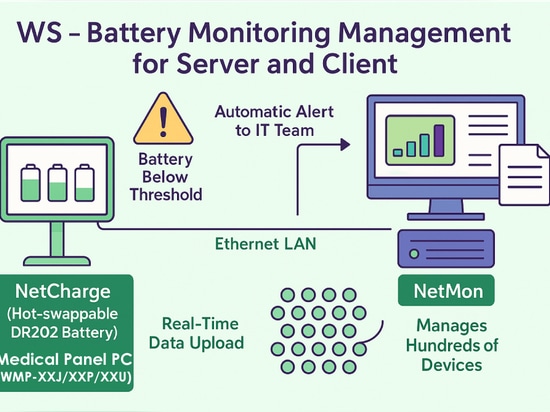
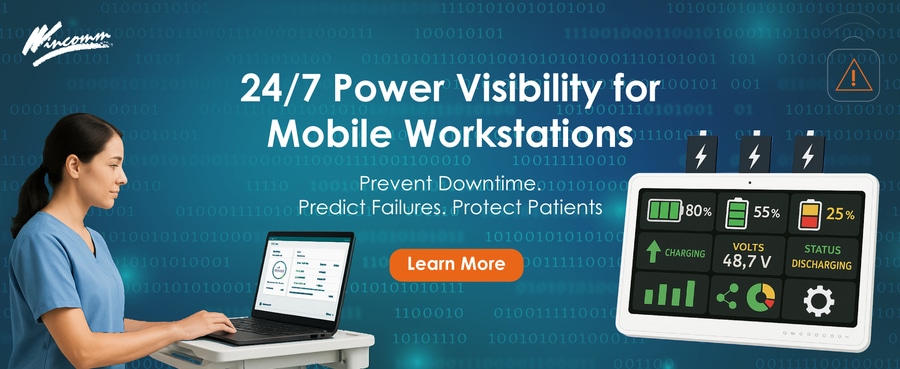
Hospitals struggling with sudden workstation shutdowns, battery‑related fires, and soaring help‑desk tickets have a new ally: Wincomm’s WS‑Battery Monitoring Management Suite, the twin‑application solution that pairs NetCharge on every battery‑powered device with NetMon at the server room.
The hidden cost of unmanaged batteries
Recent studies suggest that as much as 50 % of biomedical service calls are triggered by drained or failed batteries in mobile equipment, generating downtime that can jeopardise patient safety and delay care delivery. The U.S. FDA has even warned of fires and explosions linked to mobile medical‑cart batteries.
HOW THE WINCOMM SUITE WORKS
Key features – all available for Windows 10 / 11 systems – include remote battery capacity optimization, programmable alerts, and minute-level logging with graph visualization and one-click CSV/XLSX export.
BENEFITS FOR HOSPITAL OPERATIONS
。 Zero-interrupt workflow – Live alerts warn IT teams before batteries fall below a user-defined threshold, giving nurses time to swap packs without abandoning the cart.
。 Fire-risk mitigation – Early detection of overheating or rapid voltage drops lets staff remove suspect batteries before they become a hazard.
。 Lower IT workload – Centralized dashboards and filterable device lists replace manual rounding, cutting ticket volume and extending battery life cycles.
。 Zero-interrupt workflow – Live alerts warn IT teams before batteries fall below a user-defined threshold, giving nurses time to swap packs without abandoning the cart.
。Regulatory readiness – Automatic history logs create an audit trail for The Joint Commission and ISO 13485 power-management requirements.
。 Scalable roll-out – One NetMon instance can watch hundreds of NetCharge clients over standard Ethernet with no recurring license fees.
FAST DEPLOYMENT
1. Install NetCharge (≈ 3 min) on each Wincomm swappable-battery AIO.
2. Spin up NetMon on a Windows server or Wincomm edge box.
3. Auto-discover devices, set alarm thresholds, and start logging.
No middleware, subscriptions or custom code required.